





On 9 January 2025, as the Kenneth Fire burned, an evacuation warning meant for three communities in Los Angeles County reached nearly ten million people instead. A correction went out twenty-two minutes later. That was not an AI failure. It was a targeting failure.
The county had coded the alert correctly. The precise location never made it into the federal alerting channel, so the message went out to everyone. People far from any danger were told to prepare to leave. People who genuinely needed it could not tell whether it was meant for them. The review that followed called it a dangerously unacceptable breakdown.
That is the problem I wanted to build against. So I am building Emberwatch, an AI wildfire-response system, in the open. Three agents, each on a different tier of the Microsoft stack, one module at a time, with everything shared as I go. The county is fictional. Everything that broke is real.
This is Module 1.
What Ranger does
Ranger is a public-facing help agent built on Microsoft Copilot Studio, the low-code tier. It answers the questions people actually ask during a fire. Which zone am I in. Where is the nearest shelter, and can I bring my dog. Is the fire still burning near me, and what is the official message.
The answers come from data, not from the model’s memory. Ranger reads three Dataverse tables: Evacuation Zone, Shelter and Wildfire Incident. Ask it about a street and it returns the zone, the status, the evacuation route and the closure, with a citation pointing back at the row it read. Change the row, and the answer changes. Nobody edits a prompt.
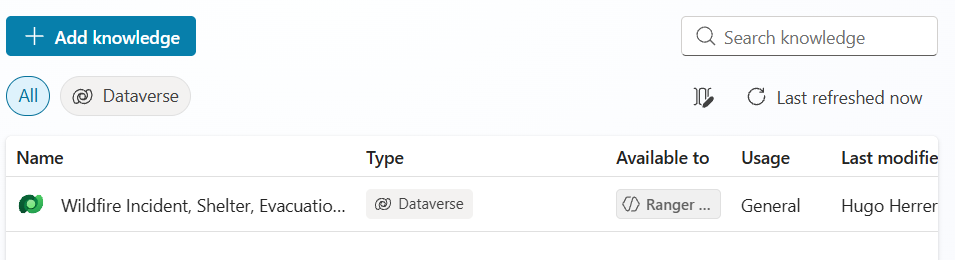
My first version had the zone list written into the agent’s instructions. It gave beautiful answers and it was, architecturally, a lie. The knowledge was just text in a prompt, and keeping it current meant editing the agent every time a fire moved. Moving it into Dataverse took an hour and turned a demo into something an emergency management team could operate.
Autonomous triggers, and what they cost
Ranger does not have to wait to be asked. Copilot Studio ships a catalogue of event triggers. Eleven sit on the Featured tab alone, among them a new row appearing in Dataverse, a scheduled recurrence, a Microsoft Form submission and an inbound email. Wire one up and an incident record landing in the system of record is enough to set the agent working.
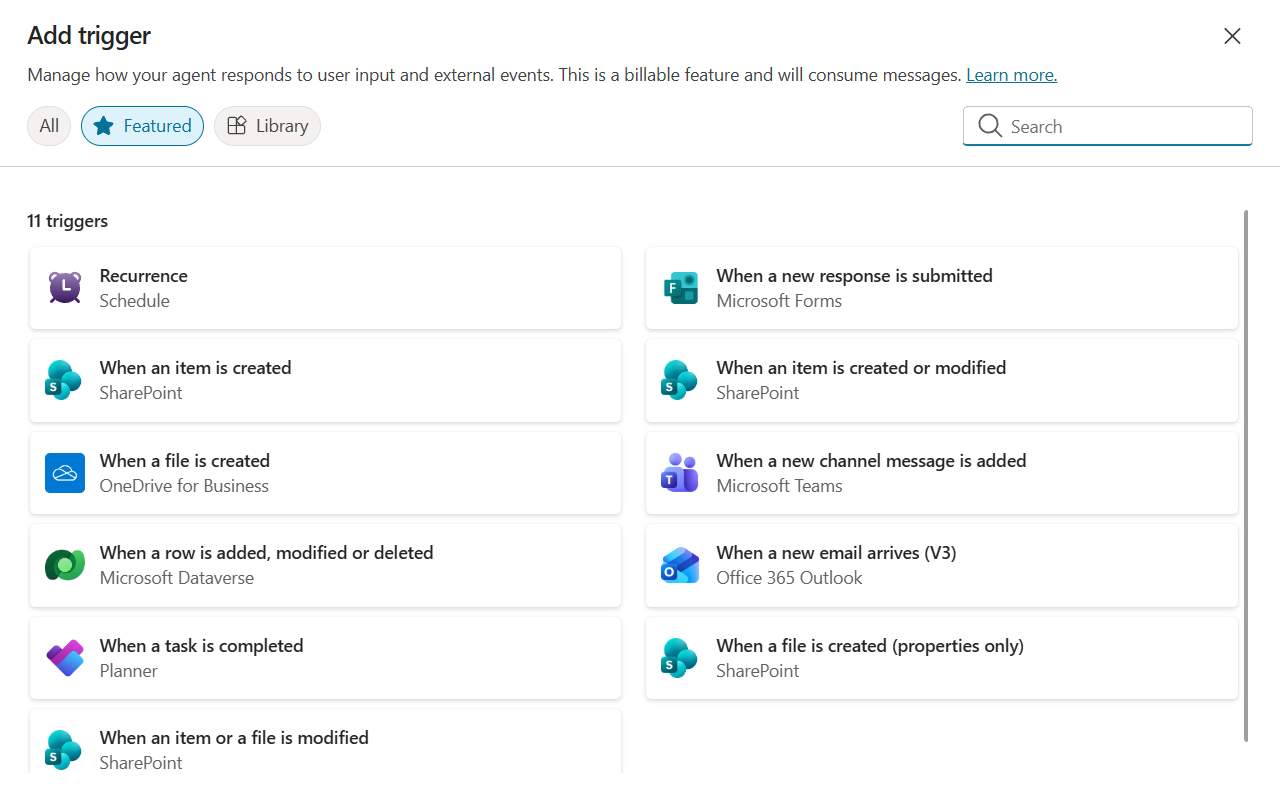
The part worth planning around sits in the dialog header. It says so itself: “This is a billable feature and will consume messages.” In the Power Platform Admin Center that consumption shows up as pay-as-you-go Copilot Credits. Price it in before you design around it. Finding out on the invoice is worse.
To be straight about where I have got to: for Module 1 I confirmed the triggers exist and what they cost. I have not wired one up and fired it. That is the next thing, and it gets its own write-up.
Three things that broke
Nobody learns anything from the screenshots where it worked.
1. Publishing failed on billing, and the error pointed somewhere else
Publishing the agent failed with a billing message. Meanwhile the custom web canvas I had built returned LatestPublishedVersionNotFound, which reads like a deployment or token problem and sent me looking in entirely the wrong place.
The real cause was upstream. The pay-as-you-go billing plan in the Power Platform Admin Center was scoped to a single environment, and the one I was building in was not on the list. No billing coverage meant no successful publish, which meant the channel had no published version to serve.
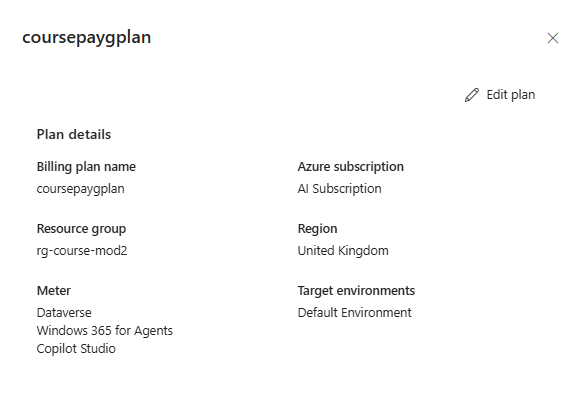
Adding the environment to the plan fixed all of it at once. If you ever see a Copilot Studio agent publish cleanly in one environment and fail in another, check the billing plan’s environment scope before you debug anything else.
2. Dataverse grounding and anonymous public access pull in opposite directions
I wanted two things at the same time. A page any resident could use without signing in, and answers grounded in Dataverse.
You cannot have both easily. Copilot Studio is blunt about one half of it. The dialog that confirms turning authentication on reads:
“Authentication is set up only for Microsoft Teams, SharePoint, Power Apps, or Microsoft 365 Copilot. This turns off any other channels and disconnects the agent from them.”
Dataverse knowledge is evaluated in the context of a signed-in user, which is what lets it honour that user’s permissions. A genuinely anonymous visitor is the wrong shape for it. So the moment I authenticate the agent so it can read Dataverse as a user, the anonymous web channel my public page depends on goes away.
The way through, for a genuinely public agent reading internal data, is to fetch that data through a Power Automate flow running on a fixed connection rather than through user-context knowledge. That is the next thing I will build, and I will report back on whether it holds up.
3. It cited the right table and still got the answer wrong
This is the one that should worry you.
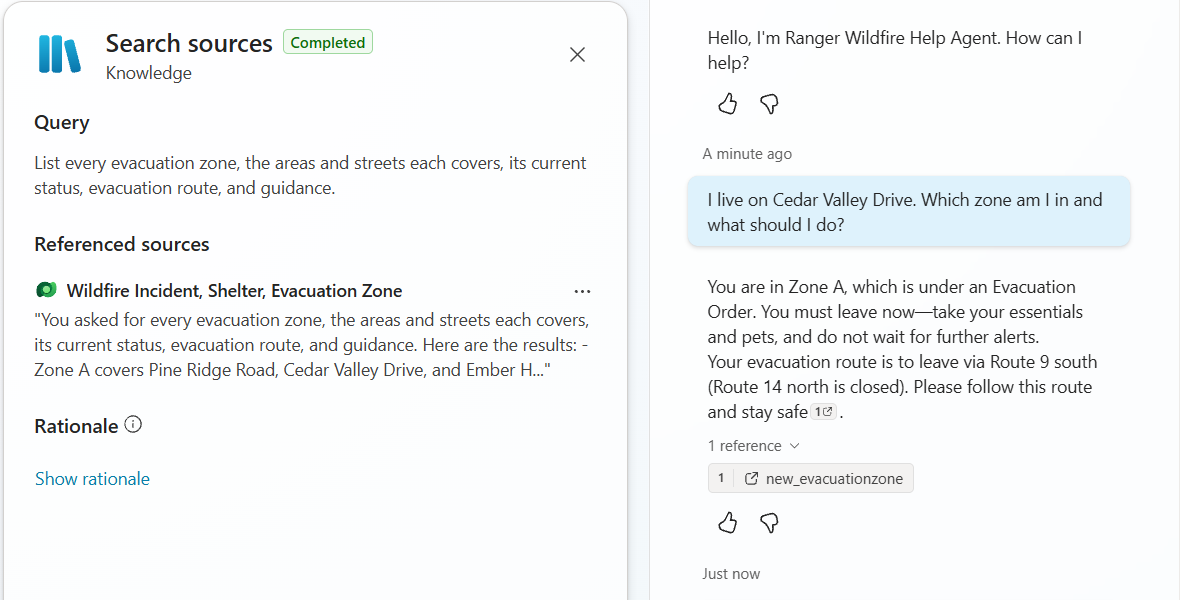
I asked Ranger whether Cedar Valley Drive was in an evacuation zone. Cedar Valley Drive is in Zone A, which was under an evacuation order. Ranger told me it was not currently in any evacuation zone. And it cited the evacuation zone table while saying it. Confident, sourced and wrong. On the one question where being wrong could get someone killed.
The cause was not the model. What I can see is that retrieval came back empty. The agent’s own search summary read “No evacuation zone was found that covers Cedar Valley Drive in the current data.” Retrieval returned zero rows. The model read zero rows as no.
My explanation is the shape of the data. Each zone’s areas were stored as one comma-separated list of streets in a single field, so a search for a single street inside that field never surfaced the row. I did not instrument the retriever, so treat that as the hypothesis the fix was built on rather than a measured cause. What is not in doubt is the behaviour: empty retrieval, confident answer, citation attached.
The lesson generalises well beyond wildfire. Grounded is not the same as correct. A citation proves the agent consulted a source. It does not prove the source held the answer, or that retrieval found it. If you are building agents on your own data, test the queries you are afraid of, not the ones you know work.
Why not just use a geofence?
A fair question about all of this. If a geofence check can tell you which zone a coordinate falls in, why involve a language model at all? An exact geometric check is cheap and auditable. An LLM is neither.
The objection is correct. The zone lookup stays in code. In my build it does exactly that. A plain coordinate check in the page, with a comment saying why, using boxes in the demo and real zone polygons in anything real. Life-safety facts should be deterministic.
The agent earns its keep on everything around that fact. Real questions are not “which zone is this coordinate in”. They are closer to this:
“I’m on Pine Ridge Road with a dog, and my mother uses an oxygen concentrator that needs mains power. What do we do and which shelter can take us?”
There is no lookup for that. It needs the zone, the shelter list, the pet policy, the medical facilities and the person’s own constraints, resolved together, in plain language, fast, for someone who is frightened. Ranger reads the shelter table, sets aside the one still on standby, and explains why the open shelter that takes pets and has medical support on site is the one that fits.
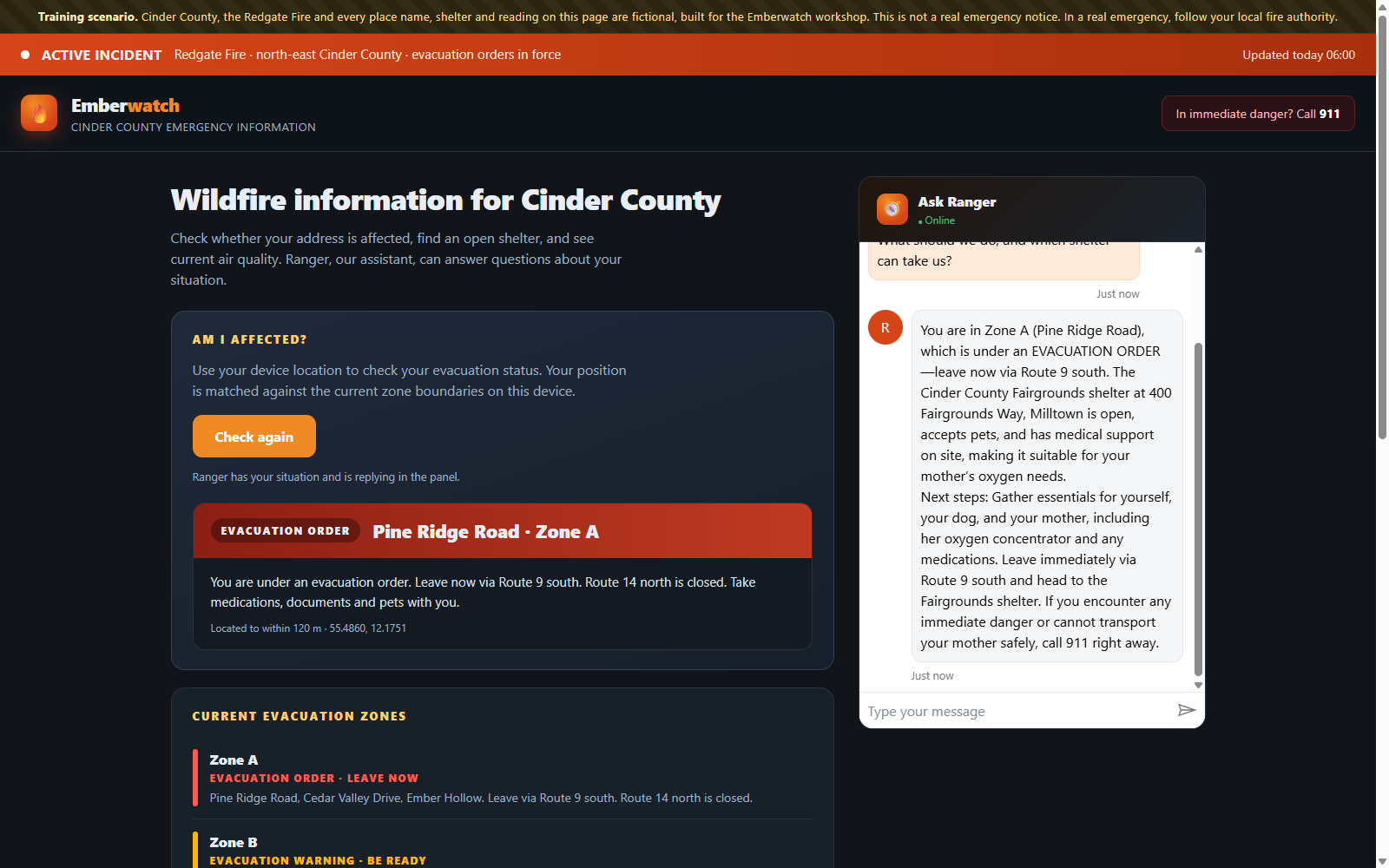
That is where the agent belongs. In front of the exact system, translating for the human. Never instead of it.
What is next
Module 2, Oracle, on Azure AI Foundry. A multimodal risk brain that reads sensor and drone imagery and issues a briefing with its evidence attached, wrapped in evals, safety guardrails and tracing.
Module 3, Incident Command, on the Microsoft Agent Framework. A team of agents coordinating a live incident end to end, with checkpointing so it resumes where it stopped, and a human approval gate before anything is dispatched.
Both get the same treatment. What worked, what broke, and what I would do differently. Emberwatch sits alongside the other things I build in the open over in Labs, and if this way of thinking about the tiers is useful, I wrote about the wider shape of it in The Four Jobs Around AI Agents.
An open offer
Building this took days, not months. Three Dataverse tables, no research budget, no data science team. The hard parts were the shape of the data and the access model, not the AI.
So here is an open offer. I will help up to two wildfire or emergency-response organisations prototype something like this, pro bono, with terms agreed together. You bring the local knowledge and the data. I build it.
If that is you, or you know who it should reach, book a one-hour scoping call.
And if you are shipping agents into production on the Microsoft stack and hitting the same grounding and retrieval walls, the same call works for that. Bring the failing query.
The workshop this is feeding
LIVE, HANDS-ON, FIVE HOURS
Build Production-Ready AI Agents with the Microsoft Stack
You build all three agents yourself. Ranger on Copilot Studio, Oracle on Azure AI Foundry and Incident Command on the Microsoft Agent Framework. One story running through all three, so you finish with a working system rather than three disconnected demos.
The tools change every six months. Knowing which tier to reach for and why does not. Low-code where low-code wins, PaaS where you need evaluation and guardrails, code-first where you need orchestration and control. Get the tier wrong and you rebuild in month three.
What you leave with:
- Three working agents you built yourself, plus the full lab repo
- A repeatable pattern for evaluating, safeguarding and observing an agent
- Hands-on multi-agent orchestration with checkpointing and human-in-the-loop
- A decision framework for choosing the right Microsoft tier for any agent
Mixed-skill friendly. A pinned lab repo with a ready-made devcontainer, so run it in GitHub Codespaces or locally and nobody is stranded on setup. No prior Azure or AI experience needed.
One prerequisite worth knowing now. Copilot Studio accepts work or school (Microsoft Entra) accounts only, and turns away personal Microsoft and Gmail accounts at sign-in. A free Microsoft 365 Developer Program account works, or use the credentials provided on the day, which is also what lets you publish and use autonomous triggers rather than only build and test.
Saturday 22 August 2026. Live and virtual. Five hours, hands-on.
10am EDT · 3pm BST · 4pm CEST
Reserve a seat on the 22 August workshop
Use code HUGO50 for 50% off at checkout.
Run by Hugo Herrera (BEng, MCP, MCTS), Microsoft AI Business Solutions Architect and author of both editions of the Microsoft Power Platform Solutions Architect’s Handbook, with 15 years designing and shipping enterprise solutions on the Microsoft stack.
Cinder County, the Redgate Fire and every place name, shelter and reading in this project are fictional, built for the Emberwatch workshop. The January 2025 Los Angeles alert referenced at the top is a real reported event. Nothing in this project is a live emergency service. In an emergency, follow your local fire authority.
0 Comments